Tendor Screenshot Organizer Pro
Turn a chaotic screenshot folder into searchable, dated categories with a preview and verified undo.
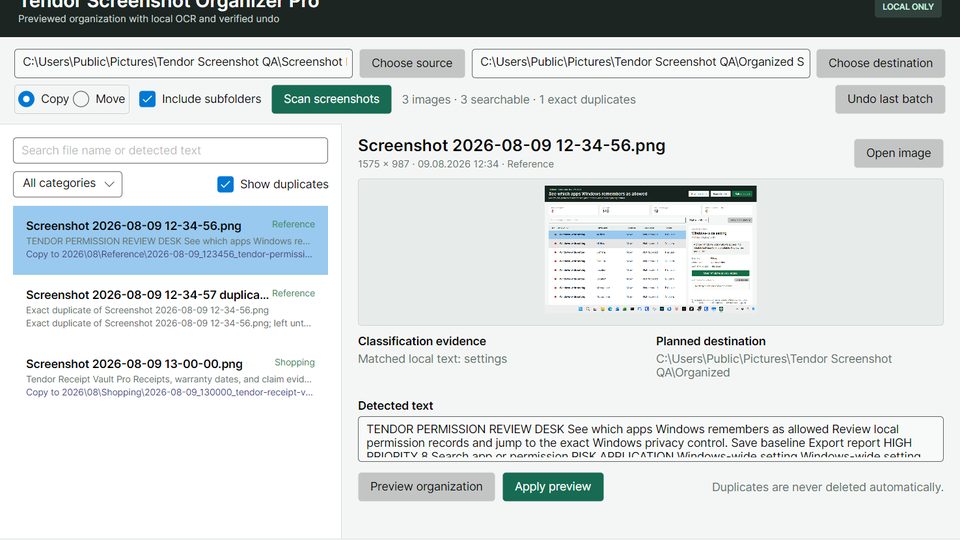
Screenshots pile up with vague names, repeated copies, and information you cannot find later. Tendor Screenshot Organizer Pro scans the folder you choose, reads visible text with Windows OCR, and prepares a dated category structure for the backlog already on your PC.
Search the detected text, review Error and support, Shopping, Travel, Messages, Work and study, Reference, and Other categories, and see every planned destination before a file changes. Exact duplicates are marked and left untouched. Copy mode keeps every source file; optional Move mode first copies to a temporary file, verifies the SHA-256 content hash, commits the destination, and only then removes the source. Name conflicts receive a safe suffix.
Every applied batch has a local undo journal. Undo checks the current file hash and refuses to remove or move a file that changed after organization. The destination must remain outside the source tree to prevent repeated self-import. There is no account, cloud upload, advertising, analytics, subscription, or automatic deletion. Classification is transparent local keyword matching, not semantic AI, and Windows OCR accuracy depends on image quality and installed languages.
Send feedback and reproducible problem reports to support@tendor-it.de. Complimentary individual support is not included.
9,99 €
7 Tage kostenlos testen — danach einmalig kaufen. Kein Abo.
Im Microsoft Store öffnen